

We have published a video to accompany this blog.
You can watch it below.
Introduction – Advanced Cyber Security Measures for Small Businesses
It’s currently 3rd of June, 2025, and today I’m doing a video and blog on cyber security. More specifically, this covers Advanced Cyber Security, specifically for Small Businesses (up to 500 people). [Author note – this page has been updated several times since June].
Note the blog is more comprehensive than the video so be sure to read it as content is being added as things change!
It’s a little bit different to what I’d normally say, and the reason for that is that the cyber security situation is getting so bad that we are advising our customers to take more stringent, advanced measures to protect themselves from cyber attacks. And I just heard on the news before doing this video/blog that Cartier and North Face have just been hit by attacks. Two more brand names, but don’t be fooled. These hackers aren’t just after big companies and well-known companies. They’re indiscriminate. They’ll go after anyone. No matter how big or small you are, how well known you are, it doesn’t matter.
So it’s down to us as business owners or people that work in organisations, charities, schools, everything basically, to make sure that we’re protected as much as we reasonably can be from these attacks.
Our standard approach
So we’ve published this blog, but just to start off with, I should explain that, what we would normally recommend customers to do is to get accredited for the government backed scheme, which is Cyber Essentials or Cyber Essentials plus (which is an added advanced level).
You can find out more here or just search on Google – Cyber Essentials Accreditation.
That ticks a lot of the basic boxes for a business or organisation to get themselves protected.
It is a self-assessment and you (or we) have to answer a lot of questions about your setup and there’ll be questions that you can’t answer (so there will be gaps).
So what we do with our customers is, we answer all the questions, and for new customers, where there are gaps, we tell them what we need to do to fix the gaps and fill them, and then we give them a fixed fee to put all of that in for them.
It might be quite a simple task. Or it might be a more involved task. It just depends on their starting point.
And it covers everything from dealing with devices on your network that have old software on them, to users and starters, password policies, IT policies, a lot of the basic stuff including multifactor authentication or two-factor authentication, which is really important, which helps to stop hackers getting through onto your accounts if they steal your user name and password.
But……one of the reasons why we’re doing this blog/video today is that we’re seeing, and have seen for a little while, reports and actual instances where hackers are getting past the security measures, getting past two-factor authentication and multi-factor authentication.
So, it’s often appropriate to ask the questions whether these advanced measures, which I’m going to mention quickly in this vidoe/blog, are relevant and appropriate for a business organisation to consider implementing.
Author note – 15/10/25 – The National Cyber Security Centre has now issued a very handy Cyber Toolkit for Small Businesses – you can find it here!
We need a more advanced approach now – here it is
We are just going to run through here very briefly.
Stricter controls
The first thing to consider is to apply stricter controls, particularly when staff are using or working from outside of trusted networks, so when staff are working from home remotely or on the go.
This can reduce the opportunity for compromises to take place, but it can impact the user’s experience and it’s going to probably ask them a lot more frequently for validation of their credentials (them signing in). So it needs to be carefully planned and considered, but we need to certainly think about it.
Depending on your router/firewall, we could also clock certain countries from trying to access your network – you know the ones! Sounds obvious…
MFA/2FA Multi-Factor Authentication/2 Factor Authentication
The next thing to talk about is multi-factor authentication or two-factor authentication, which I mentioned previously.
This is an absolute must and in recent years is a requirement of Cyber Essentials (it didn’t used to be which is mad!).
So, in its basic format, what happens is, if you log on from an unknown device or IP address, you’ll get a text message with a code that you can then put in to get past it so you can log in.
We’re now recommending that you take a more robust route for that, which is using Microsoft’s or Google’s Authenticator apps, which are apps that you can put in. for use on your smartphone.
One further point here – the authenticator app should have FACE ID access only envoked.
Another point….all your smart phone apps that are critical should have FACE ID or Biometric access control envoked!
You can do this (on iPhone for example) by holding down on the app and then selecting FACE ID access. This stops anyone that has swiped your smartphone from accessing apps on it just by opening them!
So people like the NHS use this, banking has used this kind of thing for years – It just gives you stronger protection against phishing and various other attacks and security keys provide a nice secure login experience, especially when you’re outside of the office network.
But as I said, these are not fail safe anymore.
Hackers are getting past these measures.
It’s like cops and robbers.
The hackers get past measures, the software vendors put more measures in !
Email sending limits
We need to consider setting limits on how many emails people can send from their email account.
The reason for this is, if somebody does get attacked and someone gains control of their email account, what they tend to do is they send out loads of emails to their clients disrupting everything, sometimes asking for banking details to be changed and all sorts of things.
So by setting a limit on how many emails each person can send, it won’t necessarily stop things from happening, but it certainly will alert us. We’ll get alerts on our system to say that something has gone wrong and we can act fast – it’s an alert mechanism basically.
For those customers or organisations that use bulk email sending machines like MailChimp and CRM systems, this isn’t going to apply to those, but it’s just really for when you’re using your normal desktop email.
Further email security measures
We should consider implementing something called DMARC/DKIM.
DMARC helps to prevent email spoofing and is set up on your DNS control panel (it can be quite technical so you need to know what you are doing to avoid introducing deliverability issues).
It basically verifies the sender’s identity so the email receiving servers know it is genuine and stops criminals impersonating your domain.
It is an absolute must really and certainly, if you are using email systems (like CRM’s and MailChimp) you are going to need this to help your emails not get marked as ‘spam’.
Internal/external email tagging
When using Microsoft, we can flag/tag all emails as either INTERNAL or EXTERNAL.
So if an email comes from a colleague of yours within your company network and it shows as being EXTERNAL, you know the email is a problem.
This sounds pretty basic but it is not a standard feature!
Accessing files and doing investigations – segmenting networks
One of the problems is if somebody does get hacked and it comes to our attention or the customer’s attention, trying to find out exactly what’s happened can be quite tricky and cumbersome and time consuming.
And someone is going to need to do it!
There’s something called Microsoft Purview Audit Premium, which allows advanced logging and deeper insights. This is a cost option, as with many of these things, but does enable detailed investigation.
Another thing to consider is segmenting your computer network or networks. – making sure that users only have access to the networks that they actually need to.
Advanced Threat Detection
The next thing is taking over more control of advanced security measures and controls on the most likely attack medium, which is email.
Email is where most of the attacks come in.
So using automated software like Microsoft Defender for Office 365 to protect issues with phishing protection from dangerous links and quarantining users from suspect emails is definitely worth having. Of course there are lots of third party email spam prevention products out there. The problem with some of these is that sometimes emails are delayed or possibly quarantined when they shouldn’t be, which means users have to log in and ‘release them’ which can be painful and time consuming.
It automates a lot of the process. It reduces the chances of someone being tricked into clicking a malicious link.
For example, transferring funds to a fraudster prevents users from accidentally landing on phishing sites or malware traps, and it also streamlines email handling as well.
Look at the picture below – this is a good example of a phishing email (October 2025) – it even has the word ‘victim’ in it….
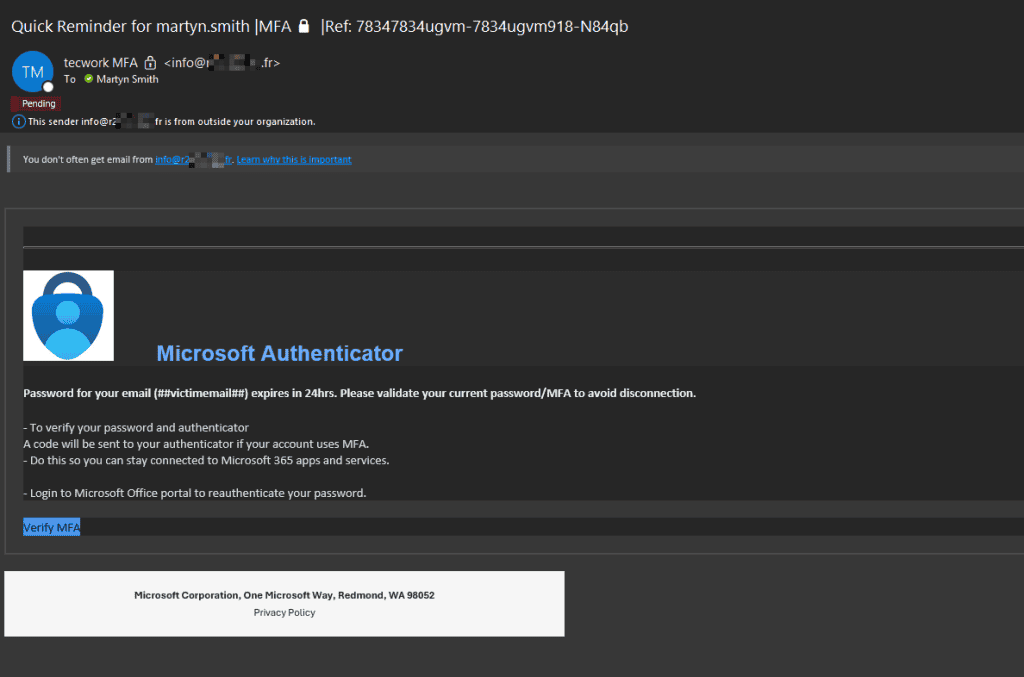
Phishing email 2025
This is an example of a phishing email in 2025
Security Awareness Training
It’s a sad thing to say but, almost regardless of what technical security measures you put in place, the most important aspect is people!
Staff and users of the systems you have are the last line of defence!
Some may be less vigilant than others.
So next thing is security awareness training. Quite often the most vulnerable parts of your network are your users, unfortunately, and it’s still really the number one cause of breaches is by staff and users clicking on things causing problems.
Obviously some people are better than others with this. So if you have ongoing phishing simulations and training so you can manage this process, find out who are the more vulnerable users, who are the more gullible, being completely honest, and try to give people as much training as possible.
It’s not just links and clicking on links that is a problem.
There’s social engineering threats these days where attempts could be made by really quite elaborate setups, where a user might get an email from somebody that looks like they’re from, just to use an example, toysrus.co.uk but it actually says toysruz.co.uk – just using that as an example, and they can potentially look like the email is actually from that company and it’s very easy to get tricked.
So we can provide software training which sends out a lot of these tricks (they’re not real , but they’re tricks to trick you and trying to impersonate what might happen).
This does help staff with training and it reinforces good habits and certainly improves vulnerability reporting – and it also creates a reporting culture.
Here is a great example I read on Linked In when Mike Soutar (he is an interviewer in The Apprentice) nearly got tricked into buying a load of iTunes vouchers from who he thought was his trusted friend and contact!
Example of Social Engineering fraud
Criminals also target certain people – like Senior Management. For example, when they see someone new has joined a business, they will target those 2 individuals – the person may get an email purporting to be from a senior person, requesting information that could be used by criminals for various illgotten purposes!
This is all about timing – they prey on the new person in this example, who may be too timid to question it, for example.
The training products we roll out to customers help to train staff on these kinds of attempts!
So see it, say it, sort it!
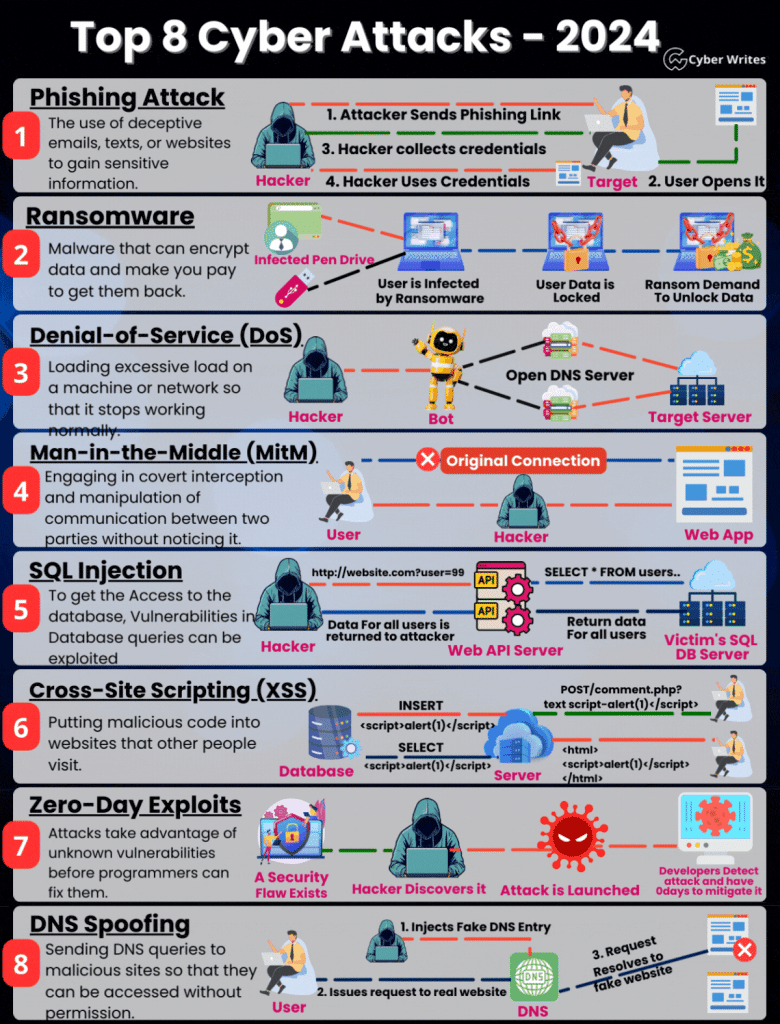
Take a look at this infographic which shows us the scope of the problem!
Backing up data
Unbelievably, this is often overlooked or simply not done properly!
For example, many people mistakenly believe that, as they use Microsoft 365, their data is backed up.
By default, it’s not!
It’s just highly available. Which means you can access it even when there is a partial issue somewhere within Microsoft as they have multiple servers in different locations.
However……
If a criminal logs in and deletes, copies or moves a load of data and you don’t realise for over 30 days (in the case of emails) or 93 days (in the case of OneDrive and SharePoint, that data will be………GONE!
Unless you back it up elsewhere. This is something we do for our customers.
So if this happens to you and a criminal ransoms you, without a proper back up you could be in major trouble!
Regular Security Reviews
The next thing on the agenda is to have a regular security review. That’s something that we can do where it covers some of these additional threats and measures and we can make sure that your setup is continuing to be set up with the best practices deployed.
Of course, it goes without saying that everyone should have some kind of decent IT Support resource. Pay lip service and you might be in trouble. If you do have a problem, you need someone you can call on with the necessary expertise to help you.
Reviewing your suppliers and their cyber security
One thing to talk about is reviewing your suppliers.
Marks and Spencer, for example, recently got attacked through one of their third party suppliers. It was an indirect attack. So ask your suppliers about their advanced cyber security measures and controls. Are they cyber essentials accredited? Do they have any other security accreditations like ISO 27001, but also review the data that you share with them and reduce withhold access to anything which is completely unnecessary.
Often, there’s no need for them to have access to data. If that’s the case, don’t give them access.
Constantly reviewing these things is a good idea.
Incident Reporting, Business Continuity and Disaster Recovery
Coming up with a proper plan if there’s an incident…. what happens?….. who does what when?, etc,
Also ensuring there’s a proper disaster recovery continuity plan. How are things locked down?
Who does it?
How are things reported to your IT support company? What do they do? How is data protected? And how is backup data restored to the organisation so staff can continue to work and continues to function?
It’s all about asking the WHAT IF questions and making sure you know what happens if that happens.
Cyber Insurance
When you are dealing with your business insurers, they should offer you cyber insurance and I suggest you take it to the levels that you need to.
They will probably ask you to do an assessment and lots of questions and you need to answer them, many of which you probably would’ve already answered if you’d done the Cyber Essentials assessment, which I refer referred to earlier.
Hiscox is an insurer we use in our business.
Summary and what to do next
Those are the advanced steps.
You can obviously pay very pricey cyber experts to come in and do these reviews for you.
If you are a small to medium sized business that might be cost prohibitive for you.
What we’re offering really in these advanced steps is to not be a silver bullet, but to give you as good a basis for protecting your organisation, business, staff, suppliers as you realistically can with a reasonable budget.
This would be an ongoing thing (like maintaining a car). So it wouldn’t just be do this and forget about it, like a car that has to be serviced and maintained to certain standards and your IT setup is the same.
I hope that helps you. If you have any questions, please do get in touch with us. Whether you are a customer or whether you’re not a customer, please do get in touch .
We predominantly deal with businesses and organisations in Kent and Sussex (London also) from one user up to 250 users with the bigger companies we’re working alongside their IT departments, quite often helping their IT departments because quite often they’re quite narrow in what they get to see within it.
And we’re very broad brush in terms of all the things we do. So we have more knowledge, more broad brush knowledge.
So please to get in touch with us 01892 578666
You can email us at helpme@tecwork.co.uk
I really do hope that this has been useful to you.
Written by Nick Brandon
Find me on Linked in